How Account Executives Can Research Prospects Faster Using LinkedIn
For Account Executives, the quality of their outreach is directly tied to the quality of their research. A generic, one-size-fits-all message gets ignored. A personalized, insightful message that speaks to a prospect's specific challenges and priorities is what starts conversations and builds pipeline. The best place to find this information is LinkedIn.
The problem? Research is a time-consuming black hole. It's easy to spend hours scrolling through profiles and company pages, only to have a handful of leads to show for it. To be a top performer, you need to research smarter, not harder. You need a system to quickly identify the right prospects, gather the most relevant intelligence, and move on.
This guide provides a clear, actionable framework for AEs to research prospects on LinkedIn faster and more effectively, helping you save time and focus on what you do best: selling.
1. Optimize Your Own Profile First: The Foundation of Credibility
Before you even begin researching others, your own LinkedIn profile must be optimized. Why? Because the first thing a prospect does when you reach out is look at your profile. A strong profile builds instant credibility and makes them more receptive to your message.
- Craft a Prospect-Centric Headline: Go beyond "Account Executive." State who you help and the outcome you provide.
- Example: "Helping B2B SaaS Companies Shorten Their Sales Cycle and Increase Deal Velocity"
- Write a Compelling "About" Section: Use the Problem-Agitate-Solve framework to show you understand their world.
2. Master Sales Navigator Search: From Broad Lists to Targeted Leads
The biggest time-waster in LinkedIn research is starting with a list that is too broad. LinkedIn Sales Navigator is non-negotiable for efficient prospecting.
-
Use Advanced Filters to Pre-Qualify: Don't just filter by title and industry. Use high-intent filters to find prospects who are more likely to be receptive.
- "Posted on LinkedIn in past 30 days": Finds active users who will actually see your message.
- "Changed jobs in last 90 days": Targets new leaders with fresh budgets and a mandate to make changes.
- Company Headcount & Department Headcount: Narrows down to companies of the right size.
-
Use Boolean Logic: Combine keywords with operators like
AND,OR, andNOTto create hyper-specific queries (e.g.,("VP of Sales" OR "Sales Director") AND "SaaS" NOT "Enterprise").
A precise search that yields 100 perfect prospects is far more valuable than a broad search that yields 5,000 irrelevant ones.
3. The 60-Second Profile Scan: A Framework for Rapid Qualification
Once you have a targeted list, you need a system to quickly vet each profile. You shouldn't spend more than 60 seconds on this initial qualification. Your goal is to quickly answer one question: "Is this person worth my time?"
Here's what to look for:
- Headline & "About" Section (15 seconds): Do their headline and summary align with your ICP? Are they talking about challenges you can solve?
- Recent Activity (30 seconds): This is the goldmine. What have they posted, liked, or commented on in the last month? Their activity is a direct window into their current priorities. If a VP of Marketing is liking posts about "demand generation," you have your conversation starter.
- Experience & Keywords (15 seconds): Quickly scan their job history for relevant experience. Look for keywords in their job descriptions that match your solution.
If a profile doesn't immediately show relevance, move on. Don't waste time trying to force a fit.
4. Automate the Tedious Parts of Research & Data Entry
One of the most time-consuming parts of research is transferring data from LinkedIn to your CRM or spreadsheet. Manually copy-pasting names, titles, and profile URLs is a huge productivity killer.
This is where a smart automation tool becomes essential. It can handle the repetitive, low-value tasks, freeing you up to focus on high-value analysis.
Streamline Your Workflow with Bindago
A secure desktop application like Bindago can be the engine for your research process. Here’s how it speeds things up:
- Build Your List in Sales Navigator: Create a hyper-targeted search of your ideal prospects.
- Export the Entire List to CSV: Instead of manually copy-pasting, you can use Bindago to export the entire search result to a clean CSV file. This file will contain names, titles, companies, profile URLs, and more.
- Import into Your System: You can now import this clean, structured list directly into your CRM or a prospecting dashboard.
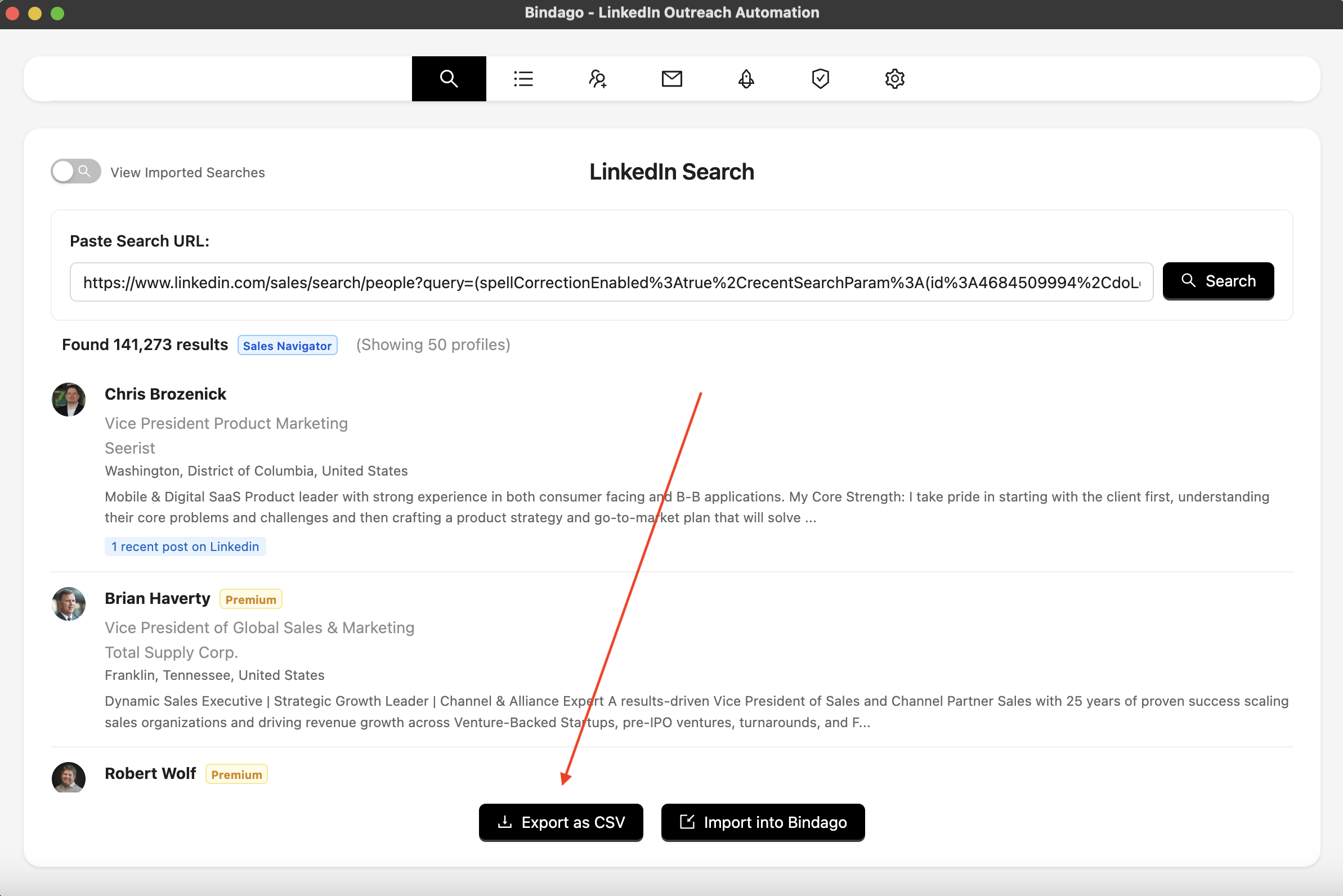
This process takes what would be hours of manual data entry and condenses it into a few minutes. It allows you to build a comprehensive, organized prospect database quickly, which is the foundation of efficient research.
5. From Research to Outreach: Using Your Intel
Once you have your organized list, your research becomes targeted. Instead of randomly browsing, you can go down your high-priority list and do a "deep dive" on the top 10-20 prospects for the day.
Because you've already pre-qualified and organized them, you can spend a focused 5 minutes on each of these top-tier prospects, gathering the deep insights you need for a truly personalized message.
- Your Automated Nurturing: For the rest of the list (the "Tier 2" prospects), you can use a tool like Bindago to launch a "warm-up" campaign. This sequence can automatically view their profile, like a recent post, and send a personalized connection request, ensuring that you are consistently building your network and warming up future prospects while you focus on your top targets.
Conclusion: Speed Through Systems, Not Shortcuts
Researching prospects faster isn't about spending less time on research; it's about spending less time on the wrong activities. By building a system that combines precise targeting, rapid qualification, and smart automation, you can eliminate wasted effort and focus your valuable time on the insights that lead to conversations.
The framework is simple:
- Target with precision using Sales Navigator.
- Qualify in 60 seconds.
- Automate data entry and list building.
- Focus your deep research on the highest-priority leads.
Adopt this approach, and you'll find that you can conduct high-quality research, personalize your outreach, and still have time left to do what you do best—sell.
Ready to build a faster, smarter research process? Download Bindago today and start your 10-day free trial.
