How to Create a Prospecting Dashboard for LinkedIn
Effective LinkedIn prospecting is more than just sending connection requests; it's a systematic process of identifying, engaging, and nurturing leads. As you scale your outreach, it becomes impossible to manage hundreds of prospects from your inbox alone. Conversations get lost, follow-ups are forgotten, and valuable leads slip through the cracks.
A prospecting dashboard is the solution. It's a centralized system—often a simple spreadsheet—that brings order to the chaos. It allows you to track every prospect, monitor your outreach efforts, and measure what's working, turning your LinkedIn activity from a series of random tasks into a predictable lead generation engine. This guide provides a clear, step-by-step framework for creating and using a LinkedIn prospecting dashboard.
1. Why You Need a Prospecting Dashboard
A well-structured dashboard is the command center for your entire LinkedIn sales strategy. It helps you:
- Stay Organized: Keep all your prospect information, from LinkedIn profiles to conversation notes, in one place.
- Ensure Consistent Follow-Up: Never let a warm lead go cold again. A dashboard tells you exactly who to follow up with and when.
- Measure Your Performance: Track key metrics like connection acceptance rates and message response rates to understand what's working and what's not.
- Build a Predictable Pipeline: By tracking prospects as they move through your funnel, you can start to forecast your sales results more accurately.
2. The Tools You'll Need
Building a powerful prospecting dashboard doesn't require expensive, complex software. You can start with three essential tools:
- A Spreadsheet (Google Sheets or Microsoft Excel): This will be the foundation of your dashboard.
- LinkedIn Sales Navigator: While you can use free LinkedIn, Sales Navigator is essential for its advanced search filters and list-building capabilities, which are crucial for finding high-quality prospects.
- An Automation Tool: Manually transferring data from LinkedIn to your spreadsheet is a time-consuming bottleneck. A tool that can export data and automate outreach is critical for efficiency.
3. Building Your Prospecting Dashboard: A Step-by-Step Guide
Here’s how to create your dashboard from scratch.
Step 1: Create Your Spreadsheet and Define Your Columns
Open a new Google Sheet or Excel file. These columns form the backbone of your dashboard:
- Full Name: The prospect's full name.
- LinkedIn Profile URL: A direct link to their profile for easy access.
- Job Title: Their current role.
- Company: The company they work for.
- Status: This is the most important column for tracking. Use a dropdown menu with stages like:
IdentifiedConnection SentConnectedFollow-Up 1Follow-Up 2Replied - PositiveReplied - NegativeMeeting BookedNot a Fit
- Last Contact Date: The date of your last interaction.
- Next Follow-Up Date: A formula can automatically set this (e.g.,
Last Contact Date + 7). - Notes: A space for important context (e.g., "Mentioned they are struggling with X," "Connected via mutual friend Y").
Step 2: Populate Your Dashboard by Exporting Prospects
This is where manual work can kill your productivity. Instead of copy-pasting hundreds of profiles, you need an efficient way to get your prospect lists from LinkedIn into your spreadsheet.
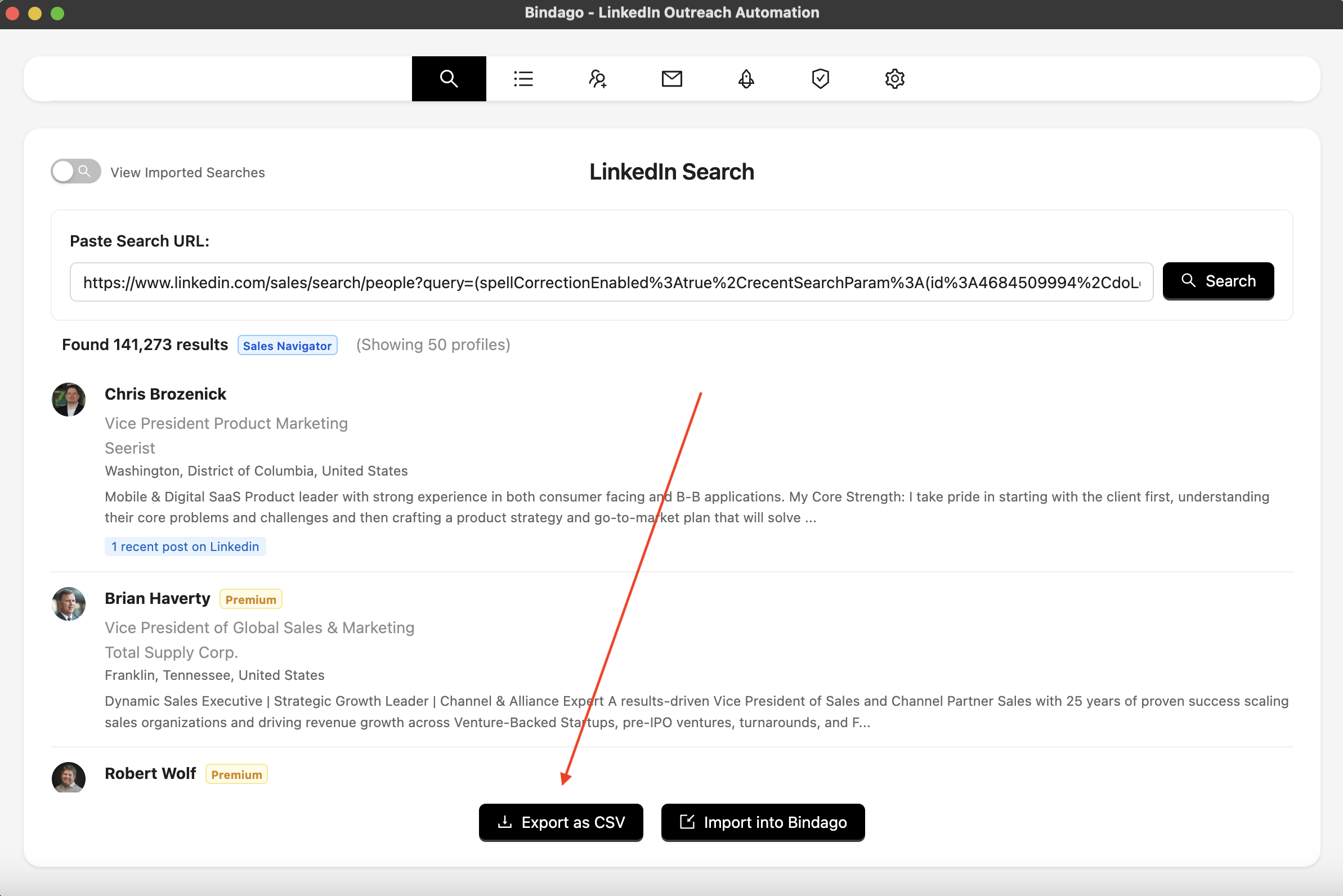
This is where a powerful automation tool like Bindago becomes essential. Bindago is a desktop application that lets you automate your LinkedIn outreach and data management securely.
- Build a List in Sales Navigator: Use Sales Navigator’s advanced filters to create a hyper-targeted list of your ideal prospects.
- Export the List with Bindago: With Bindago, you can export your Sales Navigator search results directly into a clean CSV file. This file will contain all the key information, including names, titles, companies, and LinkedIn profile URLs.
- Import into Your Dashboard: Simply copy the data from the exported CSV file and paste it into your spreadsheet. In minutes, you’ve populated your dashboard with hundreds of qualified leads.
Step 3: Track Your Outreach and Update Statuses
As you engage with your prospects, diligently update their "Status" in the dashboard. This is how you track your entire pipeline.
- When you send a connection request, update their status to
Connection Sent. - When they accept, update to
Connectedand log the date. - When you send a follow-up, update to
Follow-Up 1.
Systematize Your Outreach with Automation
This tracking process can be seamlessly integrated with your outreach automation. With Bindago's Campaigns feature, you can create a multi-step outreach sequence. As Bindago automatically sends a connection request or a follow-up message, you can update the status in your dashboard accordingly. The system ensures every prospect is engaged, and your dashboard provides a real-time view of your campaign's progress.
4. Using Your Dashboard to Drive Results
A dashboard isn't just for tracking; it's for making smarter decisions.
- Review Your Funnel Weekly: At the start of each week, sort your dashboard by "Next Follow-Up Date" to see exactly who you need to contact.
- Identify Bottlenecks: Is your "Connection Sent" list long but your "Connected" list is short? Your connection request message might need work. Is your "Replied" rate low? Your follow-up messages may not be providing enough value.
- Forecast Your Pipeline: Over time, you'll learn your conversion rates (e.g., what percentage of connections turn into conversations, and what percentage of conversations turn into meetings). This allows you to forecast your future sales pipeline with greater accuracy.
The Bindago Advantage: The Engine for Your Dashboard
While a spreadsheet is the "brain" of your dashboard, an automation tool is the "engine" that makes it run efficiently. Bindago is the perfect partner for your prospecting dashboard because it automates the most time-consuming tasks in your workflow:
- Effortless Data Export: It provides the raw data for your dashboard by exporting clean prospect lists from LinkedIn.
- Automated Outreach Execution: It executes the outreach campaigns that you are tracking in your dashboard, from connection requests to multi-step follow-up sequences.
- Enhanced Security: As a desktop application, Bindago keeps your sensitive LinkedIn credentials on your local machine, a more secure alternative to cloud-based tools.
Conclusion: From Chaos to Control
A LinkedIn prospecting dashboard is what separates amateur outreach from a professional, scalable sales operation. It provides the structure, organization, and data you need to manage your pipeline effectively and make intelligent, data-driven decisions.
By combining the precise targeting of LinkedIn Sales Navigator, the organizational power of a simple spreadsheet, and the secure automation of Bindago, you can build a predictable lead generation machine that consistently fills your calendar with qualified meetings.
Ready to take control of your LinkedIn pipeline? Download Bindago today and start your 10-day free trial.
