Comparing Closely vs LinkedHelper (Pros and Cons)
When choosing a LinkedIn automation tool, Closely and LinkedHelper represent two fundamentally different approaches to outreach. Closely is a modern, cloud-based platform that offers AI-powered features and multi-channel capabilities, while LinkedHelper is a long-standing desktop application known for its deep customization and security.
The choice between a cloud-based tool and a desktop application is a critical one that impacts your workflow, security, and budget. This in-depth comparison will break down Closely vs. LinkedHelper across features, pricing, reliability, security, and user experience to help you make an informed decision. We'll also introduce a powerful third option, Bindago, which combines the security of a desktop app with a modern, user-friendly interface.
Feature Comparison: Cloud Convenience vs. Desktop Control
Closely and LinkedHelper are both feature-rich, but their strengths lie in different areas. Closely focuses on providing an all-in-one, "always-on" cloud solution, while LinkedHelper offers granular control over LinkedIn-specific automation right from your computer.
| Feature | Closely | LinkedHelper 2 |
|---|---|---|
| Platform | Cloud-Based | Desktop Application |
| Core Focus | AI-Powered Multi-Channel Outreach (LI + Email) | Deeply Customizable LinkedIn Automation |
| Outreach Sequences | ✅ Yes (Advanced drip campaigns) | ✅ Yes (Advanced drip campaigns) |
| AI-Powered Features | ✅ Yes (AI message personalization) | ❌ No |
| 24/7 Operation | ✅ Yes (Runs in the cloud) | ✅ Yes (Via VPS deployment) |
| Security Model | Cloud-based (requires credential sharing) | Desktop-based (credentials stay local) |
Price Comparison
The two platforms are positioned very differently in the market, which is reflected in their pricing.
| Aspect | Closely | LinkedHelper 2 |
|---|---|---|
| Starting Price | $49 / month | $15 / month (Standard plan) |
| Free Trial | ✅ Yes | ✅ Yes (14 days) |
Closely's pricing is in the mid-range for cloud-based tools, reflecting its AI and multi-channel features. LinkedHelper is significantly more affordable, making it a popular choice for individuals and small businesses, though its more advanced features are in its pricier Pro plan ($45/month).
Reliability and Customer Experience
-
Closely: As a modern cloud platform, Closely offers a clean, user-friendly interface that is generally easy to navigate. Customer support is typically responsive, and the "always-on" nature of a cloud tool means your campaigns can run without you needing to have your computer on.
-
LinkedHelper: Has been around for a long time and has a large, knowledgeable user base. It's a powerful tool with deep customization capabilities. For users who need 24/7 outreach, it can be deployed on a cloud-based VPS server for always-on operation.
Security of Your LinkedIn Account
This is the most critical difference between the two tools.
-
Closely (Cloud-Based): Like all cloud automation tools, Closely requires you to share your LinkedIn username and password with their servers. While they have security measures in place, this practice carries an inherent risk. If their platform were ever compromised, your LinkedIn account credentials could be exposed.
-
LinkedHelper (Desktop-Based): As a desktop application, LinkedHelper runs locally on your machine. Your LinkedIn credentials are never sent to or stored on a third-party server. This provides a fundamentally higher level of security and is a major reason why many security-conscious users prefer desktop solutions.
Key Highlights
Closely
- Runs 24/7 in the cloud without needing your computer to be on.
- Offers AI-powered features for message personalization.
- Modern and relatively user-friendly interface.
- Security Trade-off: Requires you to hand over your LinkedIn credentials to a third-party server.
- More expensive than desktop-based alternatives.
- Your account's activity comes from a cloud IP address, which can be easier for LinkedIn to flag.
LinkedHelper 2
- Superior Security: Your LinkedIn credentials stay on your local machine.
- Cost-Effective: The entry-level plan is one of the most affordable on the market.
- Powerful and Highly Customizable: Offers deep control over campaign workflows.
- Flexible Deployment: Can be installed on a cloud-based VPS for 24/7 operation without keeping your local machine on.
- One Account Per Subscription: Each subscription is limited to a single LinkedIn account.
A Better Alternative: Bindago - Secure, Affordable, and User-Friendly
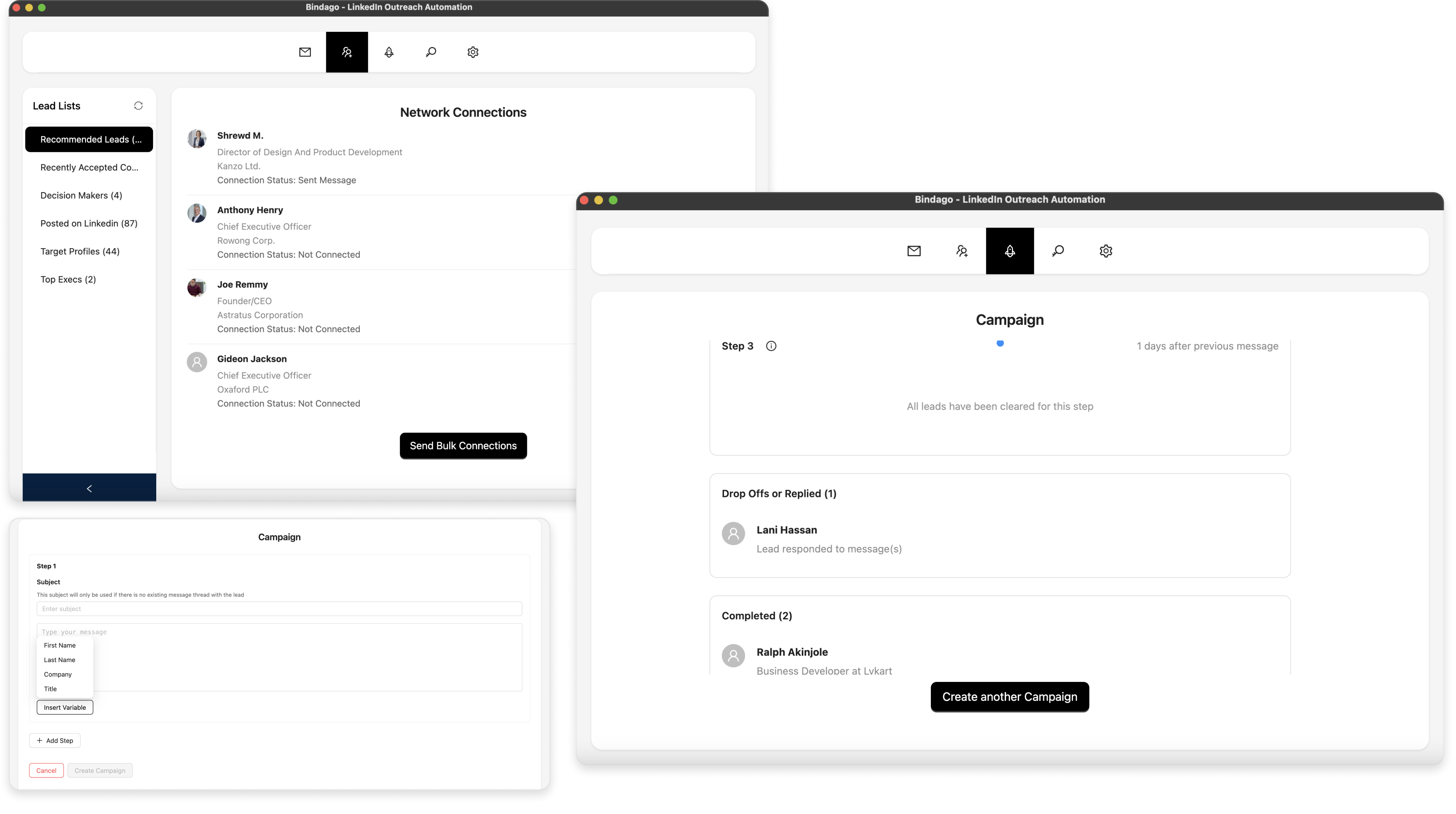
For users who want the security of a desktop application like LinkedHelper but desire a modern, easy-to-use interface without the higher cost of a cloud tool like Closely, Bindago offers the perfect solution.
- Website: https://bindago.com/
- What it does: A comprehensive desktop application for LinkedIn automation that covers all the core outreach needs: bulk connection requests, mass InMail campaigns, multi-step message sequences, and CSV exports.
- Pricing: $9.99/month (flat rate for all features)
Why Bindago is a Stronger Choice:
- The Best of Both Worlds: Bindago provides the robust security of a desktop application—your credentials stay with you—but with a clean, modern, and intuitive user interface that allows you to launch a sophisticated campaign in minutes.
- Unbeatable Value: At just $9.99/month, Bindago is significantly cheaper than both Closely and LinkedHelper's Pro plan, while offering a complete suite of powerful outreach tools.
- Complete Outreach Toolkit: It includes practical features that many competitors lack, like a dedicated bulk invitation withdrawal tool to keep your account healthy and the ability to export leads to CSV.
Conclusion: Which Tool is Right for You?
Your choice between Closely, LinkedHelper, and an alternative like Bindago comes down to your priorities:
- Choose Closely if: You prioritize the 24/7 convenience of a cloud platform and want AI-powered features, and you are comfortable with the associated security risks and higher cost.
- Choose LinkedHelper if: You are a technical power user who prioritizes deep customization and the security of a desktop app.
- Choose Bindago if: You want the best of both worlds—the security of a desktop app with a modern, user-friendly experience, all at an unbeatable price. It's the ideal choice for most professionals who prioritize safety, value, and ease of use — and want to run multiple LinkedIn accounts simultaneously.
For most users, the security trade-offs of Closely and the feature depth required to get the most out of LinkedHelper make Bindago the most logical and valuable choice, offering a professional-grade feature set and unmatched security at a price that is accessible to everyone.