How Account Executives Can Use LinkedIn to Navigate Complex Buying Committees
Modern B2B deals are rarely won by convincing a single person. Today’s purchasing decisions are made by complex buying committees, a web of stakeholders with different priorities, concerns, and levels of influence. For an Account Executive, successfully navigating this committee is the difference between a closed-won deal and a stalled opportunity lost in internal politics.
Trying to manage these relationships through email alone is like trying to conduct an orchestra through text messages—it’s inefficient and lacks nuance. LinkedIn is the ultimate platform for identifying, understanding, and engaging the entire buying committee. It provides the intelligence and access you need to build consensus and guide the deal forward. This guide provides a clear, actionable framework for AEs to master the art of navigating complex buying committees on LinkedIn.
1. The Foundation: From a Single Contact to a Committee Map
Your first step is to shift your focus from a single "lead" to a "target account" with a committee of stakeholders. Your goal is to map out this committee on LinkedIn.
Identify the Key Personas
A typical buying committee includes several key personas. You need to find them all.
- Champions: The end-users who will benefit most from your solution and will advocate for you internally.
- Influencers: Technical experts, team leads, or respected colleagues whose opinions hold significant weight.
- Decision-Makers: The budget holders, often at the VP or Director level, who have the final say.
- Blockers: Individuals who might resist change, such as the head of a department that uses a competitor's tool or someone in IT concerned about integration.
- Legal & Procurement: The stakeholders who handle the contractual and financial details.
How to Find Them on LinkedIn
Use LinkedIn Sales Navigator to build a detailed "account map."
- Start with a Target Account: Create or go to an account page in Sales Navigator.
- Use Advanced Search: Filter for employees within that company. Use job titles and seniority levels to find your key personas (e.g.,
"VP of Sales","IT Director","Procurement Manager"). - Create a Lead List for Each Account: Save 5-10 key stakeholders for each target account into a dedicated lead list. This creates a custom feed of their activity.
2. Gather Intelligence: Understand Their Priorities
Before you engage, you must become an intelligence officer. Each member of the committee has different motivations. Your job is to understand them.
- Analyze Their Digital Body Language: Scrutinize the activity of each stakeholder on your lead list.
- The CFO might be liking posts about ROI and cost-saving measures.
- The IT Director might be engaging with content about data security and integration.
- The End-User might be complaining about the shortcomings of their current tool.
- Connect Their Activity to Their Role: Their online activity is a direct window into their priorities. This allows you to tailor your messaging to what each person cares about, rather than using a one-size-fits-all pitch.
3. Execute Multi-Threaded Engagement Plays
"Multi-threading" is the process of building relationships with multiple stakeholders in an account simultaneously. This builds consensus and prevents your deal from being derailed if your single point of contact leaves the company.
The "Surround Sound" Engagement Play
Your goal is to become a familiar, trusted name to the entire committee before you ever ask for a meeting.
- Action: Over the course of a week, systematically engage with multiple stakeholders from the same account.
- Day 1: View the profiles of 5-7 key stakeholders.
- Day 3: Like a relevant post from 2-3 of those stakeholders.
- Day 5: Leave a thoughtful, value-adding comment on a post from one of the key decision-makers.
The Coordinated Connection Play
After warming up the account, send personalized connection requests to multiple stakeholders in a short period. This creates an internal "buzz" and shows you have done your homework.
- Template for an Influencer: "Hi {{firstName}}, I've been following your team's work at {{companyName}}. I'm connecting with a few leaders at the company to share some insights relevant to [Their Industry]. Would be great to connect."
- Template for a Decision-Maker: "Hi {{firstName}}, I saw your post on [Topic] and found it insightful. It aligns with the work I do helping other leaders in your space solve [Problem]. Would love to connect and share some ideas."
4. Systematize Your Committee Outreach with Automation
Manually executing these multi-threaded plays across dozens of target accounts is not scalable. It’s impossible to track every interaction, personalize every message, and follow up in a timely manner. To do this effectively, you need a system.
This is where a powerful and secure automation tool like Bindago becomes your engine for navigating buying committees. As a desktop application, Bindago allows you to automate your LinkedIn outreach safely and efficiently, all while keeping your and your clients' sensitive credentials on your local machine.
Here’s how you can use Bindago to execute your committee-based strategy at scale:
-
Create Persona-Based Campaigns: For each target account, you can create separate, tailored campaigns in Bindago for the different personas on the buying committee.
- A campaign for technical influencers could share a detailed whitepaper.
- A campaign for economic buyers could share a case study focused on ROI.
-
Automate Your Multi-Touch Sequences: Use Bindago's Campaigns feature to build an automated sequence that executes your warm-up and outreach plays.
- Step 1: Automatically View Profile of every stakeholder.
- Step 2 (2 days later): Automatically Like a Recent Post.
- Step 3 (2 days after that): Automatically send your personalized, persona-specific Connection Request and follow-up sequence.
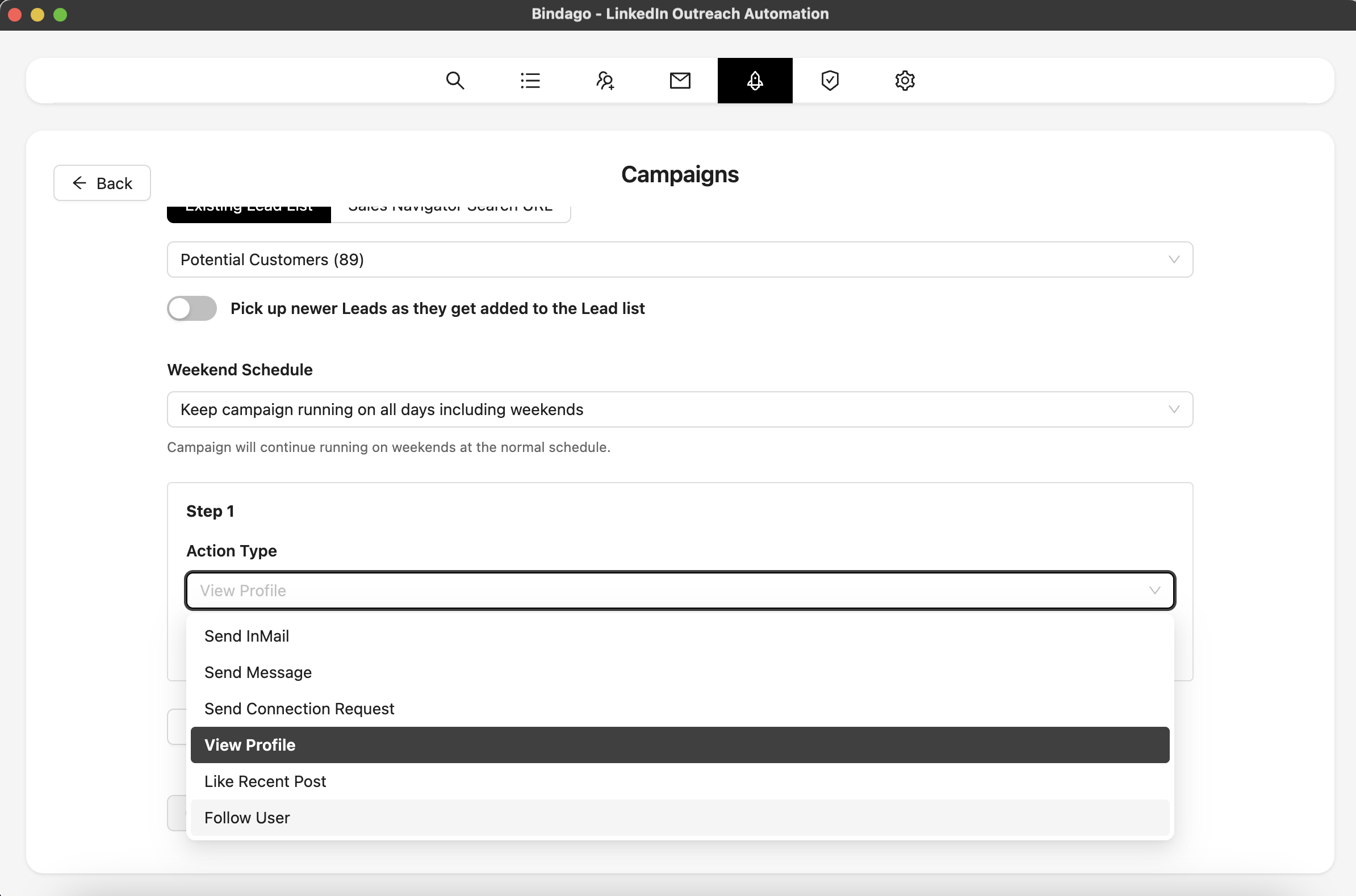
By using Bindago to systematize your outreach, you ensure that every member of the buying committee is receiving a consistent, value-driven message, dramatically increasing your chances of building broad consensus. The automation stops the moment a prospect replies, allowing you to step in and have a strategic conversation.
Conclusion: From Salesperson to Deal Quarterback
Navigating a complex buying committee is the defining skill of a top-performing Account Executive. It requires moving from a linear, one-to-one sales process to a dynamic, many-to-many engagement strategy. By leveraging the intelligence of LinkedIn to map the committee, understand their individual priorities, and engage them with a coordinated, multi-threaded approach, you can transform from a simple salesperson into the "deal quarterback."
Combine this strategic framework with a powerful and secure automation tool like Bindago, and you have a scalable, predictable system for closing larger deals, faster.
Ready to master the art of navigating buying committees? Download Bindago today and start your 10-day free trial.
