Using LinkedIn to Identify Buying Intent Signals as an Account Executive
Top-performing account executives have a secret weapon: they don't just look for leads; they look for timing. They know that reaching out to a prospect at the exact moment they are considering a purchase is the difference between a closed-won deal and a message lost in the noise. LinkedIn is a treasure trove of these timely opportunities, but only if you know how to spot the "buying intent signals."
A buying signal is any online cue that suggests a prospect or their company is actively looking for a solution like yours. Identifying these signals allows you to focus your energy on high-intent leads, personalize your outreach with surgical precision, and dramatically increase your response rates. This guide provides a clear, actionable framework for account executives to master the art of identifying and acting on LinkedIn buying signals.
1. Job Changes: The Ultimate Buying Signal
When a decision-maker starts a new role, they are in a unique position to make an impact. They have a fresh perspective, a mandate to drive change, and often, a new budget. This is the single most powerful buying signal on LinkedIn.
- The Signal: A prospect starts a new role, especially a leadership position (e.g., "VP of Sales," "Head of Marketing").
- How to Spot It:
- Use LinkedIn Sales Navigator to filter for leads who have "Changed jobs in the last 90 days."
- Monitor your feed for "Congratulations on the new role!" posts.
- How to Act on It:
- Template: "Hi {{firstName}}, congratulations on the new role at {{companyName}}! New leaders often look to make a quick impact. I have some insights on how other VPs of Sales are tackling [Specific Challenge] in their first 90 days. Would be happy to connect and share."
2. Content Engagement: Following the Digital Breadcrumbs
The content a prospect engages with is a direct window into their current priorities and pain points.
- The Signal: A prospect likes, comments on, or shares a post about a problem your solution solves. A comment like, "This is a huge challenge for our team right now," is a direct cry for help.
- How to Spot It:
- Monitor the engagement on your own company's content.
- Track relevant industry hashtags.
- Pro Tip: Monitor the comments on your competitors' posts. Prospects complaining about a competitor's feature are prime targets.
- How to Act on It:
- Template: "Hi {{firstName}}, I saw your insightful comment on the post about [Topic]. It's a challenge many in our industry are facing. I've helped other companies solve this by [Your Solution]. Would love to connect and share what's working."
3. Company-Level Signals: Growth and Hiring
A company's activity is just as important as an individual's.
- The Signal: A target company announces a new funding round, an acquisition, or is hiring for specific roles that would use your product.
- How to Spot It:
- Follow your target accounts' company pages.
- Check the "Jobs" tab on their page. A company hiring a team of SDRs will need sales enablement tools. A company hiring content marketers will need marketing automation.
- How to Act on It:
- Template (for hiring): "Hi {{firstName}}, I saw that {{companyName}} is expanding its sales team. That's exciting growth! We specialize in helping scaling teams ramp up quickly with our sales training platform. Would be great to connect."
4. Systematize Your Intent-Based Outreach with Automation
Manually tracking these signals across hundreds of prospects is not a scalable strategy. To turn this into a predictable pipeline, you need a system to act on these signals quickly and efficiently.
This is where a powerful and secure automation tool like Bindago becomes your competitive advantage. Bindago is a desktop application that allows you to automate your LinkedIn outreach safely and effectively.
Here’s how you can use Bindago to turn buying signals into pipeline:
- Build Your High-Intent List: When you spot a buying signal—like a group of people who engaged with a competitor's post or a list of new VPs of Sales from a Sales Navigator search—create a targeted list of these prospects.
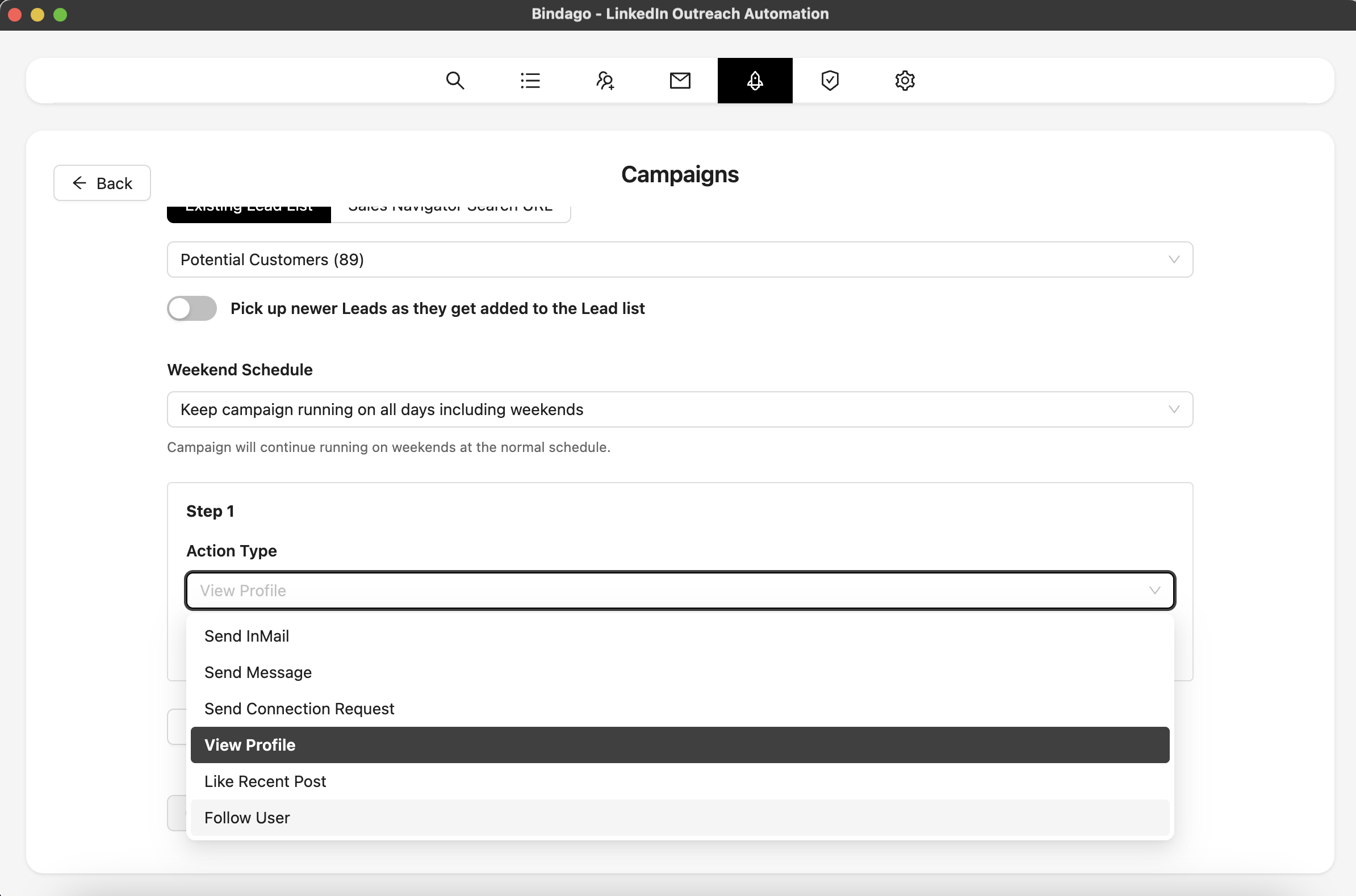
- Launch a Contextual Outreach Campaign: Use Bindago's Campaigns feature to create a multi-step sequence tailored to that specific buying signal.
- Step 1: Automatically View the Profile of every prospect on your list to warm them up.
- Step 2 (2 days later): Automatically send your personalized, contextual Connection Request using one of the templates above.
- Step 3 (3 days after connecting): Automatically send a Follow-Up Message that provides more value, like a relevant case study or article.
By using Bindago to systematize your response to buying signals, you ensure that no opportunity is missed. You can focus on the strategic work of identifying intent, while the system handles the execution of your outreach. And because it's a desktop app, your LinkedIn credentials remain securely on your computer.
Conclusion: Sell Smarter, Not Harder
The most successful account executives on LinkedIn are not the ones who send the most messages; they are the ones who send the right message at the right time. By learning to identify and act on buying intent signals, you can stop wasting time on cold, unresponsive leads and focus your energy on prospects who are already on the path to purchase.
Combine this intelligent prospecting with a powerful automation tool like Bindago, and you have a scalable, predictable system for building pipeline and crushing your quota.
Ready to turn buying signals into your most valuable lead source? Download Bindago today and start your 10-day free trial.
