How to Turn Your LinkedIn Profile Into a Mini Sales Page
Most professionals treat their LinkedIn profile like a digital resume—a static document that lists past jobs and accomplishments. This is a massive missed opportunity. In the world of B2B sales and marketing, your LinkedIn profile shouldn't be a backward-looking resume; it should be a forward-looking sales page, working 24/7 to attract, engage, and convert your ideal prospects.
A well-optimized profile doesn't just tell people what you've done; it tells them what you can do for them. It builds trust, establishes authority, and turns cold connections into warm conversations. This guide will provide you with a step-by-step framework to transform your LinkedIn profile from a passive resume into a powerful, lead-generating sales asset.
1. The Headline: Your Digital Billboard
Your headline is the most valuable real estate on your LinkedIn profile. It follows you everywhere—in search results, comments, and connection requests. It's your digital billboard, and it needs to do more than just state your job title.
A great sales-focused headline immediately answers the prospect's question: "What's in it for me?"
- Instead of: "Account Executive at Acme Corp"
- Try: "Helping B2B SaaS Companies Reduce Churn and Increase Customer Lifetime Value"
- Formula:
Helping [Your Niche] Achieve [Specific, Desirable Outcome]
This approach instantly qualifies you to your target audience and positions you as a problem-solver, not just a salesperson.
2. The "About" Section: Your Sales Letter
If your headline is the billboard, your "About" section is the full-page sales letter. This is your opportunity to tell a compelling story that resonates with your ideal customer. Don't write it like a resume summary; write it like a sales page.
A powerful framework for this is Problem-Agitate-Solve (PAS):
- Problem: Start by identifying the core problem your prospects face. Show them you understand their world.
- Example: "Many marketing leaders struggle to prove the ROI of their content marketing efforts, making it difficult to secure budget and demonstrate value."
- Agitate: Pour a little salt on the wound. Describe the negative consequences of this problem.
- Example: "This leads to a constant battle for resources, a lack of alignment with sales, and the risk of being seen as a cost center rather than a revenue driver."
- Solve: Introduce yourself and your solution. Explain how you help people overcome this specific problem.
- Example: "I help marketing leaders implement a clear, data-driven framework that connects content directly to pipeline and revenue, turning their department into a celebrated profit center."
End your "About" section with a clear Call to Action (CTA). Tell the reader what you want them to do next (e.g., "Send me a connection request," "Book a call," "DM me").
3. The Featured Section: Your Portfolio of Proof
The "Featured" section is your chance to visually showcase your expertise and provide social proof. Don't leave it empty. Use it to feature:
- Case Studies: Link to case studies that demonstrate how you've helped clients achieve tangible results.
- Testimonials: A screenshot of a glowing client testimonial or a link to a video review can be incredibly powerful.
- High-Value Content: Pin your best LinkedIn article, a link to a webinar you hosted, or a popular post that demonstrates your expertise.
- Your Company's Website or a Specific Landing Page: Drive traffic directly to a relevant page.
This section turns your claims into credible proof.
4. The Experience Section: Frame It as Results, Not Responsibilities
Don't just copy and paste the job descriptions from your resume. Reframe your experience to highlight your accomplishments and the results you delivered.
- Instead of: "Responsible for managing a portfolio of enterprise accounts."
- Try: "Managed a $2M portfolio of enterprise accounts, achieving 115% of quota in 2023 by focusing on a multi-threading strategy that increased deal size by 30%."
Use quantifiable metrics wherever possible. Numbers are more compelling than words.
5. Driving Traffic and Converting Visitors into Leads
An optimized profile is a powerful asset, but it's useless if no one sees it. You need a system to drive qualified traffic to your new "sales page" and engage with the visitors.
This is where you can combine strategic outreach with smart automation. The goal is to proactively engage with your ideal prospects, prompting them to visit your profile and, once they do, converting that interest into a conversation.
This is where a tool like Bindago becomes your engine for growth. Bindago is a desktop application that helps you automate your LinkedIn outreach safely and efficiently.
Here’s how you can use Bindago to turn your profile into a lead generation machine:
-
Proactively Generate Profile Views: Use Bindago's Campaigns feature to create a "warm-up" sequence. You can set up a campaign to automatically view the profiles of hundreds of your ideal prospects. A high percentage of these people will be curious and view your profile in return, driving qualified traffic directly to your new sales page.
-
Engage Your Profile Visitors: For those who view your profile, you can launch a targeted outreach campaign. Send a personalized connection request that acknowledges their visit and opens the door to a conversation.
- Template: "Hi {{firstName}}, thanks for stopping by my profile. I see you're also in the [Industry] space. Would love to connect with another professional in our field."
-
Nurture New Connections: Once they connect, use a multi-step message sequence in Bindago to nurture the relationship. Your first message could share a valuable resource, and subsequent messages can continue to build trust before you ever ask for a meeting.
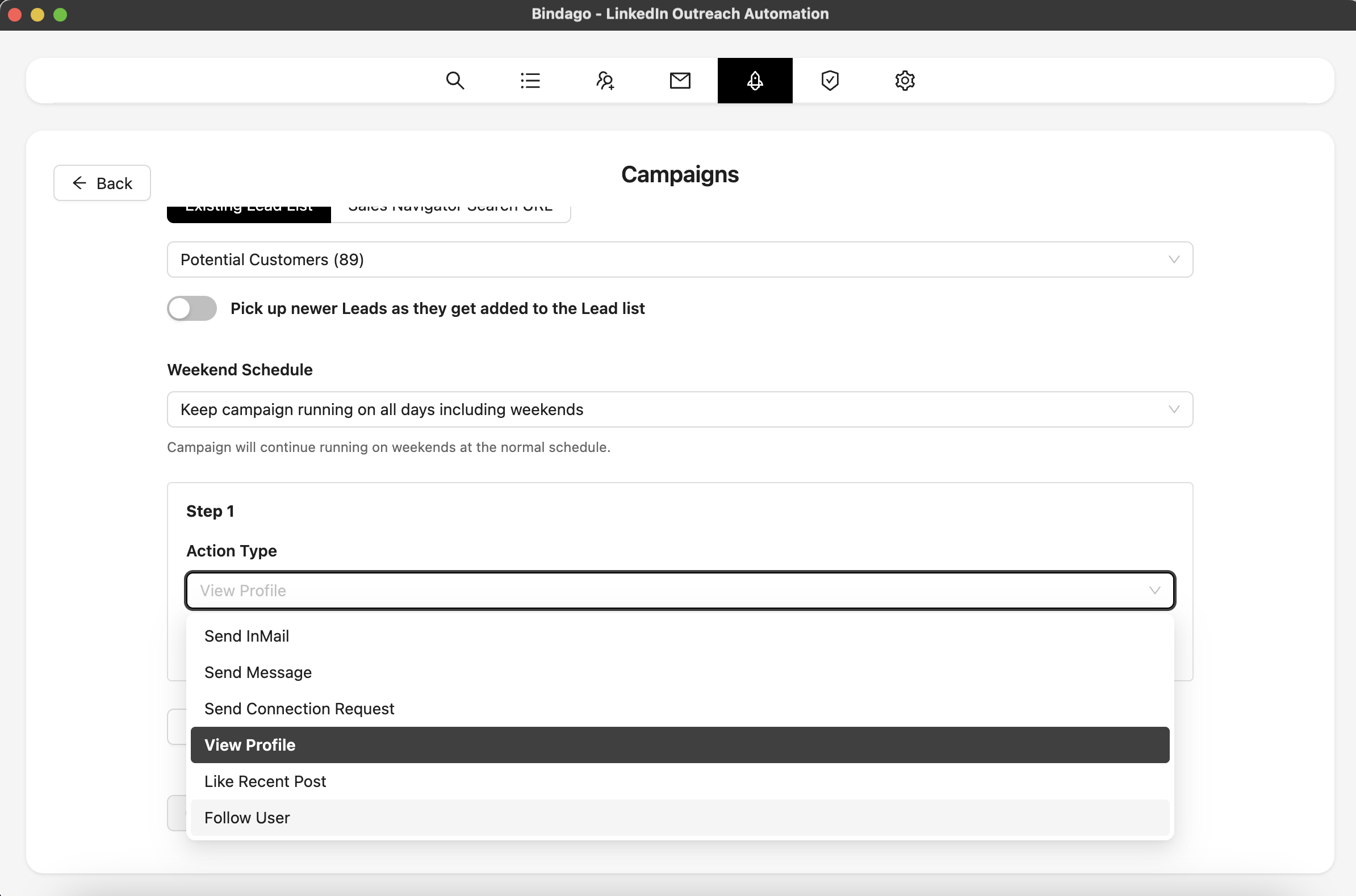
By using Bindago to automate this workflow, you create a predictable system that drives traffic to your profile and converts that traffic into warm conversations, all while you focus on closing deals. And because it's a desktop app, your LinkedIn credentials remain securely on your computer.
Conclusion: Your Profile is Your Most Powerful Sales Tool
Stop thinking of your LinkedIn profile as a static resume. It is a dynamic, powerful sales tool that can work for you around the clock. By optimizing your headline, summary, and experience sections to focus on the problems you solve for your ideal customers, you can transform your profile into a mini sales page that builds trust and attracts opportunities.
Combine that powerful asset with a systematic approach to driving traffic and engaging visitors, and you will have a predictable engine for generating high-quality leads and building a powerful personal brand.
Ready to turn your LinkedIn profile into a lead generation machine? Download Bindago today and start your 10-day free trial.
