How to Automate LinkedIn Message Follow-ups with Bindago
In B2B sales, the fortune is in the follow-up. A single connection request or initial message is rarely enough to start a conversation. Prospects are busy, inboxes are crowded, and it often takes multiple touchpoints to get a response. Studies show that 80% of sales require at least five follow-ups, yet most salespeople give up after just one or two attempts.
Manually tracking and sending personalized follow-up messages to hundreds of prospects is a logistical nightmare. It’s time-consuming, prone to human error, and simply not scalable. This is where automation becomes a sales professional’s most powerful ally.
This guide will show you how to use Bindago to create and automate a powerful LinkedIn follow-up system that feels personal, delivers value, and converts connections into conversations.
Why a Follow-Up System is Non-Negotiable
A systematic follow-up process is the engine of a predictable sales pipeline. It ensures that:
- No Lead is Left Behind: Every new connection receives a timely and relevant follow-up, preventing warm leads from slipping through the cracks.
- You Stay Top-of-Mind: Consistent, value-driven touchpoints keep you on your prospect's radar, so when they are ready to buy, you're the first person they think of.
- You Build Trust Over Time: A good follow-up sequence is not about pestering; it's about building a relationship by providing value at each step.
- You Save Countless Hours: Automation handles the repetitive work, freeing you up to focus on having meaningful conversations with interested prospects.
The Anatomy of a Follow-Up That Gets Replies
An effective follow-up message is never "just checking in." It’s a strategic touchpoint designed to re-engage the prospect by offering new value.
A great follow-up message has three key components:
- Context: It references your previous interaction (e.g., "Thanks for connecting," or "Following up on my last message about...").
- Value: It provides a new, helpful piece of information—a relevant article, a case study, an insightful question, or a useful tip.
- A Clear Call-to-Action (CTA): It guides the prospect toward a simple next step.
How to Automate Your Follow-Up Sequences with Bindago
Bindago is a powerful desktop application that allows you to build and automate multi-step message sequences for your LinkedIn connections. Because it runs on your computer, your LinkedIn credentials remain secure, offering a safer alternative to cloud-based tools.
Here’s how to set up your automated follow-up system.
Step 1: Install Bindago and Log In
First, download the Bindago application for your operating system (Windows, macOS, or Linux). After installing, launch the app and log in to your LinkedIn account.
Step 2: Create a Campaign and Define Your Audience
In Bindago, navigate to the "Campaigns" section. Here, you can create a new campaign and define who will receive your follow-up sequence. You can target prospects from:
- A Sales Navigator Lead List.
- A Sales Navigator Search URL.
- A list of Profile URLs you've gathered.
Step 3: Design Your Multi-Step Follow-Up Sequence
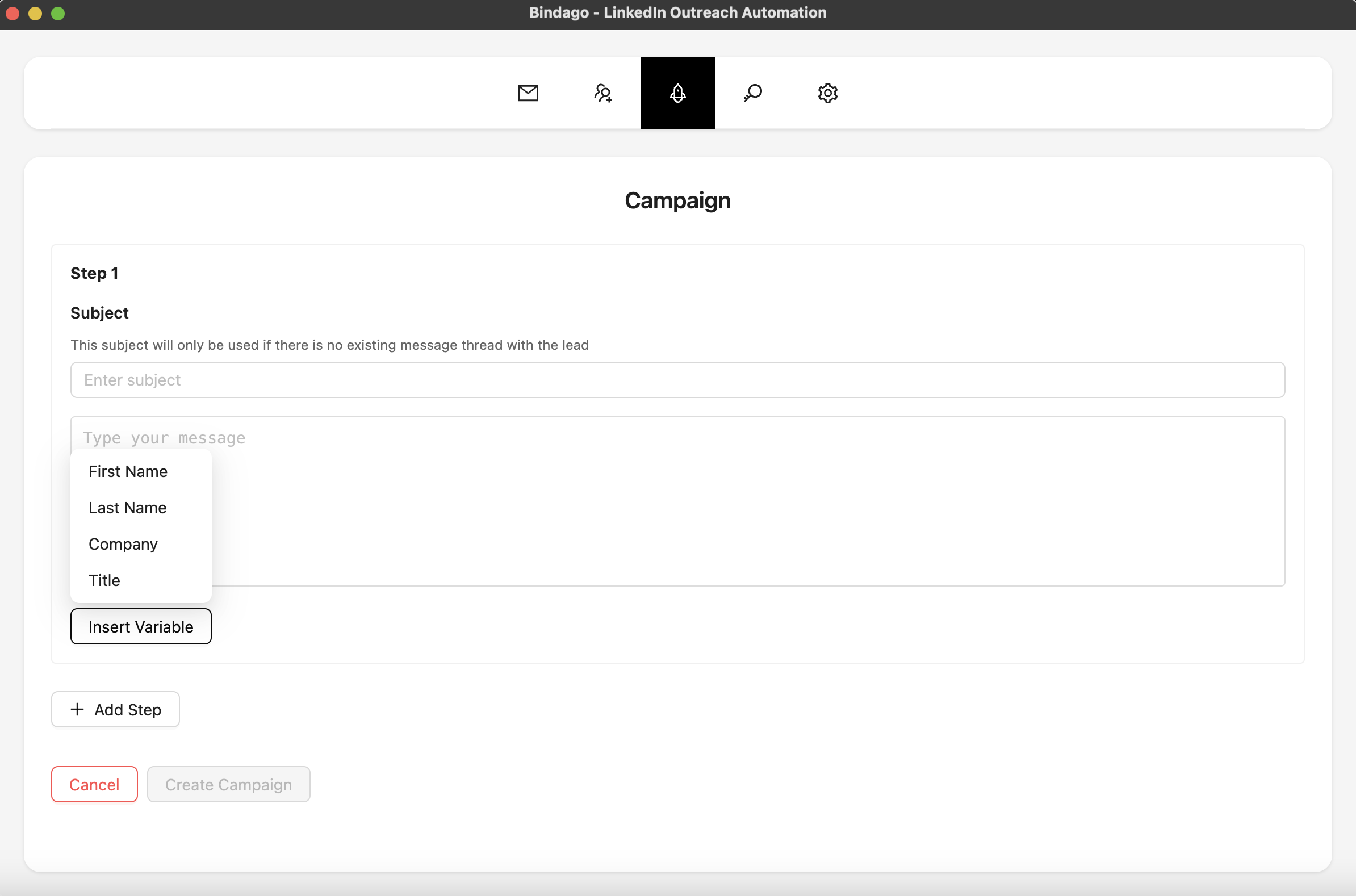
This is where you build your automated follow-up machine. In the campaign setup, you can add a series of "Send Message" actions, each with a specific delay.
A proven follow-up sequence could look like this:
-
Step 1: The Initial Follow-Up (3 days after connecting)
- Action Type: "Send Message"
- Condition: "Wait till connection request is accepted" (if your campaign starts with a connection request).
- Message: A value-driven message, not a pitch.
"Thanks for connecting, {{firstName}}! I saw you're focused on [Area of Responsibility] at {{companyName}}. I recently wrote a short guide on [Relevant Topic] that I thought you might find useful. [Link to resource]"
-
Step 2: The Insightful Follow-Up (7 days later)
- Action Type: "Send Message"
- Message: Share a new insight or ask a thoughtful question.
"Hi {{firstName}}, I was thinking about our shared interest in [Topic]. I'm curious, how is your team preparing for [Upcoming Industry Trend]? We've seen some interesting approaches."
-
Step 3: The Soft Call-to-Action (14 days later)
- Action Type: "Send Message"
- Message: Transition towards a business conversation.
"Hi {{firstName}}, I hope the resources I shared were helpful. We specialize in helping companies like yours achieve [Specific Outcome]. Would you be open to a brief 15-minute chat next week to explore if this could be relevant for you?"
Step 4: Launch and Monitor
Once you've designed your sequence, launch the campaign. Bindago will automatically send each message at the scheduled interval. The automation is smart: the sequence for a prospect will stop automatically as soon as they reply, allowing you to step in and have a real, human conversation.
Best Practices for Automated Follow-Ups
- Provide Value at Every Step: Each message should offer something new and helpful.
- Personalize Your Templates: Use variables like
{{firstName}}and{{companyName}}to make your messages feel one-to-one. - Keep it Natural: Use a conversational tone. Write like you speak.
- Don't Be Afraid to Use a "Break-Up" Message: If a prospect doesn't reply after 3-4 messages, your final message can be a graceful exit, like: "I know you're busy, so I won't follow up again. If this becomes a priority later, feel free to reach out." This often gets a reply because it removes the pressure.
Conclusion
A systematic follow-up process is the key to turning LinkedIn connections into real business opportunities. By combining a value-driven messaging strategy with the powerful and secure automation of Bindago, you can build a predictable pipeline of warm leads without spending hours on manual follow-ups.
Stop letting warm leads go cold. Start building your automated follow-up machine today.
Ready to automate your follow-ups and close more deals? Download Bindago today and start your 10-day free trial.
