LinkedIn Templates Every Account Executive Should Save and Reuse
As an Account Executive, your time is your most valuable asset. You need to be efficient, effective, and constantly building your pipeline. LinkedIn is a goldmine for prospecting, but without a system, it can be a huge time sink. The key to scaling your outreach without sacrificing quality is to build a library of proven, reusable templates.
Templates are not about sending generic, spammy messages. They are about creating a starting point for personalization, allowing you to maintain a high standard of outreach while moving quickly. This guide provides a collection of essential LinkedIn templates that every AE should save, adapt, and reuse to start more conversations and close more deals.
1. The Perfect Connection Request Templates
The goal of a connection request is simple: get the prospect to accept. Your message should be short, personalized, and non-salesy.
Template 1: Based on a Mutual Connection
Leveraging a shared connection is the warmest possible opening.
"Hi {{firstName}}, I see we're both connected to [Mutual Connection's Name]. I'm also in the [Your Industry] space and am always keen to connect with other professionals in their network. Would be great to connect."
Template 2: Based on Their Content
This shows you're paying attention to their ideas and positions you as a peer.
"Hi {{firstName}}, I really enjoyed your recent post on [Topic]. Your point about [Specific Insight] was particularly insightful. Would love to connect and follow your work."
Template 3: Based on a Trigger Event (New Job, Company News)
A trigger event provides a timely and relevant reason to reach out.
"Hi {{firstName}}, congrats on the new role as [Job Title] at {{companyName}}! It's an exciting move. I work with other leaders in [Their Industry] to help them [Achieve Outcome] during this kind of transition. Would love to connect."
2. Essential Follow-Up Message Templates
The real work begins after the connection is made. A systematic follow-up process is what turns a connection into a conversation.
Template 1: The "Value-Add" Follow-Up (3 days after connecting)
Your first message should give, not ask.
"Thanks for connecting, {{firstName}}! I saw on your profile that you're focused on [Area of Responsibility]. I recently came across this in-depth guide on [Relevant Topic] and thought you might find it useful. [Link to resource]"
Template 2: The "Insightful Question" Follow-Up (7 days later)
If you get no reply, your next step is to spark a conversation with a thoughtful question.
"Hi {{firstName}}, I'm curious, given your role at {{companyName}}, how is your team approaching the challenge of [Relevant Industry Challenge] this quarter? We've seen some interesting strategies emerge."
Template 3: The "Graceful Exit" (14 days later)
If you still get no response, it's time to bow out professionally. This often gets a reply because it removes all pressure.
"Hi {{firstName}}, I know you're busy, so I won't follow up on this again. If [Your Value Proposition] ever becomes a priority, please feel free to reach out. Wishing you and the team at {{companyName}} all the best."
3. The "Stalled Deal" Revival Template
Every AE has deals that go cold. Instead of the tired "just checking in" email, use LinkedIn to re-engage with value.
"Hi {{firstName}}, hope you're well. It's been a little while since we last spoke about [Original Problem]. We've actually just released a new case study with [Similar Company] on how they solved that exact challenge, and it made me think of you. Here's the link if you're interested: [Link]. No pressure at all, just thought it might be valuable."
4. How to Manage and Scale Your Templates with Automation
Having a library of great templates is one thing, but managing them and knowing when to use them for hundreds of prospects is a logistical nightmare. Manually copying, pasting, and tracking your outreach is not a scalable system.
This is where a smart automation tool becomes an AE's best friend. It allows you to systematize your proven templates into powerful, multi-step outreach sequences.
A tool like Bindago is designed for this exact purpose. It's a desktop application that helps you automate your LinkedIn outreach safely and efficiently. With Bindago, you can:
- Build a Template Library: Save all your proven templates directly within the app for easy access.
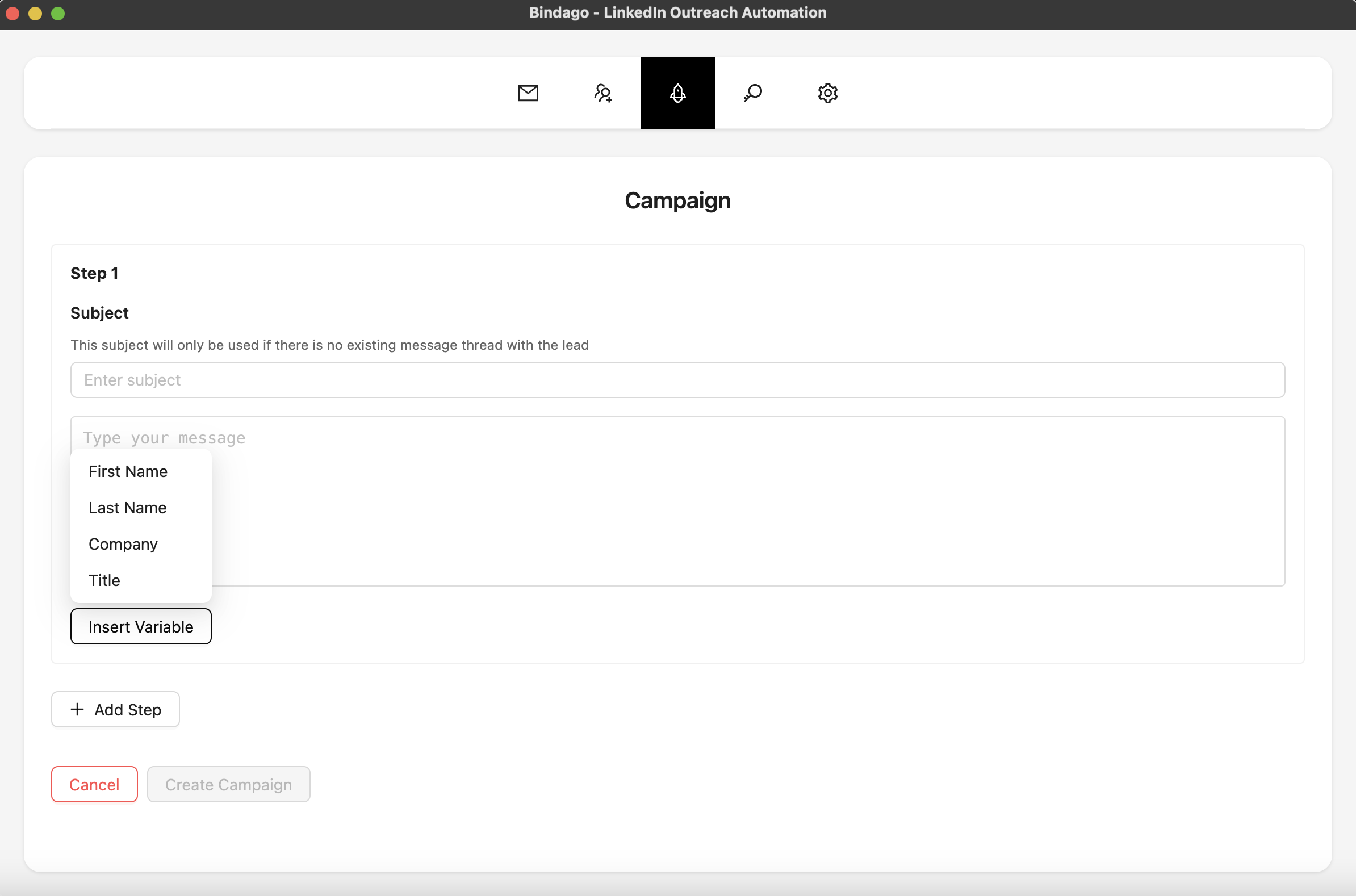
- Create Multi-Step Campaigns: Turn your templates into an automated sequence. For example, you can build a campaign that automatically sends your personalized connection request, waits for the prospect to accept, and then sends your "Value-Add" follow-up message three days later.
- Personalize at Scale: Use Bindago's personalization variables (
{{firstName}},{{companyName}},{{title}}) to ensure that every message in your sequence feels one-to-one.
By using Bindago, you can ensure that every prospect receives a thoughtful, strategic sequence of messages, dramatically increasing your response rates. The automation stops the moment a prospect replies, allowing you to step in and have a real conversation. And because it's a desktop app, your LinkedIn credentials remain securely on your computer.
Conclusion: Systematize Your Success
Top-performing Account Executives are not just great at selling; they are masters of process. By building a library of effective LinkedIn templates and using a powerful automation tool to deploy them, you can create a predictable system for generating conversations and building pipeline.
Stop wasting time on manual, repetitive tasks. Start building your template library, systematize your outreach, and focus your energy on what you do best: closing deals.
Ready to turn your best messages into a scalable outreach machine? Download Bindago today and start your 10-day free trial.
