How to Repurpose Content From Other Platforms for LinkedIn
Creating high-quality content consistently is one of the biggest challenges for professionals looking to build their brand on LinkedIn. The pressure to come up with fresh ideas daily can lead to burnout and inconsistency. But what if you already have a wealth of valuable content that's just waiting to be discovered by your LinkedIn audience?
The secret that top content creators use to stay consistent and save countless hours is content repurposing. By adapting your existing content from other platforms—like your blog, YouTube channel, or even Twitter feed—you can create a powerful, efficient content engine for LinkedIn. This guide will show you how to do it effectively.
Why Repurpose Content for LinkedIn?
Before diving into the "how," it's important to understand the "why." Repurposing content is not about being lazy; it's about being smart.
- Massive Time Savings: You don't have to start from a blank page every time. You've already done the hard work of creating the core idea.
- Reach a New Audience: Your LinkedIn network is different from your blog subscribers or YouTube audience. Repurposing introduces your best ideas to a new set of eyes.
- Reinforce Your Message: Repetition is key to memory. Presenting the same core idea in different formats helps to solidify your authority on a topic.
- Platform-Native Experience: Simply dropping a link to your blog or YouTube video on LinkedIn is not effective. The algorithm favors native content that keeps users on the platform. Repurposing adapts your content to fit LinkedIn's preferred formats.
1. How to Repurpose a Blog Post for LinkedIn
A single blog post is a goldmine of potential LinkedIn content. Here’s how to break it down.
Strategy 1: The "Key Takeaways" Text Post
- Action: Read through your blog post and pull out the 3-5 most important takeaways. Turn these into a concise, scannable text post on LinkedIn. Use bullet points or numbered lists to make it easy to read.
- Example: If your blog post is "The Ultimate Guide to Cold Emailing," your LinkedIn post could be:
"Wrote a full guide on cold emailing, but here are the 3 things you absolutely need to get right:
- A subject line that sparks curiosity, not a sales pitch.
- A first sentence that is 100% about them, not you.
- A clear, low-friction call-to-action. Master these, and you'll double your reply rate."
Strategy 2: The "Section-by-Section" Carousel
- Action: Turn the main sections or headings of your blog post into a visually engaging carousel (PDF document). Each slide can represent a key point.
- Example: For the same cold email guide, you could have a 5-slide carousel:
- Slide 1: Title - "The Anatomy of a Perfect Cold Email"
- Slide 2: "The Subject Line"
- Slide 3: "The Opening Line"
- Slide 4: "The Body & CTA"
- Slide 5: "The #1 Mistake to Avoid"
Strategy 3: The "Deep Dive" LinkedIn Article
- Action: Copy and paste the entire blog post into a native LinkedIn Article. This makes the content fully accessible on the platform and can help with SEO, as LinkedIn Articles are indexed by Google.
- Pro Tip: At the end of the LinkedIn Article, include a link back to the original post on your website to drive traffic.
2. How to Repurpose a YouTube Video for LinkedIn
Video is powerful on LinkedIn, but simply sharing a YouTube link is not the best approach. Here’s how to repurpose your video content.
Strategy 1: The "Valuable Snippet"
- Action: Cut a 60-90 second, high-impact clip from your longer YouTube video. This could be a key insight, a powerful quote, or a quick "how-to" segment. Upload this clip directly to LinkedIn with captions.
- Why it Works: Native video performs significantly better in the LinkedIn feed than external links.
Strategy 2: The "Video Transcript" Post
- Action: Take the transcript of your video and turn it into a text-based post. Pull out the most compelling points and format them for readability.
- Example:
"I just recorded a video on [Topic], but for those who prefer to read, here's the key takeaway..."
Strategy 3: The "Quote Graphic"
- Action: Find a powerful, memorable quote from your video and turn it into a simple, shareable graphic. Post the graphic with a caption that provides more context.
3. How to Repurpose a Twitter Thread for LinkedIn
Twitter threads are, by nature, a series of concise, connected ideas—perfect for repurposing.
Strategy 1: The "Expanded Post"
- Action: Take the core idea from your Twitter thread and expand on it in a longer-form LinkedIn post. LinkedIn allows for more characters, so you can add more detail, context, and nuance.
Strategy 2: The "Thread-to-Carousel"
- Action: Turn each tweet from your thread into a separate slide in a LinkedIn carousel. This is a quick and easy way to create a visually appealing piece of content that is already optimized for scannability.
4. Systematize Your Content Distribution and Engagement
Creating and repurposing content is only half the battle. To turn that content into real business opportunities, you need a system to engage with the people who interact with it. The likes and comments on your repurposed content are a list of warm leads.
Manually reaching out to every person who engages with your posts is not scalable. This is where a smart automation tool like Bindago can be a game-changer.
How Bindago Helps You Capitalize on Your Content:
- Identify Engaged Prospects: After you post your repurposed content, you have a list of people who have liked or commented. These are high-intent prospects.
- Launch a Targeted Outreach Campaign: You can create a list of these prospects and use Bindago's Campaigns feature to launch a multi-step outreach sequence.
- Step 1: Send a Contextual Connection Request.
- Template: "Hi {{firstName}}, thanks for engaging with my post on [Topic]. Since you're clearly interested in this area, I thought it would be great to connect."
- Step 2 (3 days after connecting): Send a Value-Driven Follow-Up.
- Template: "Thanks for connecting! As you're interested in [Topic], I thought you might find the full blog post/video on the subject useful. [Link to original content]"
- Step 1: Send a Contextual Connection Request.
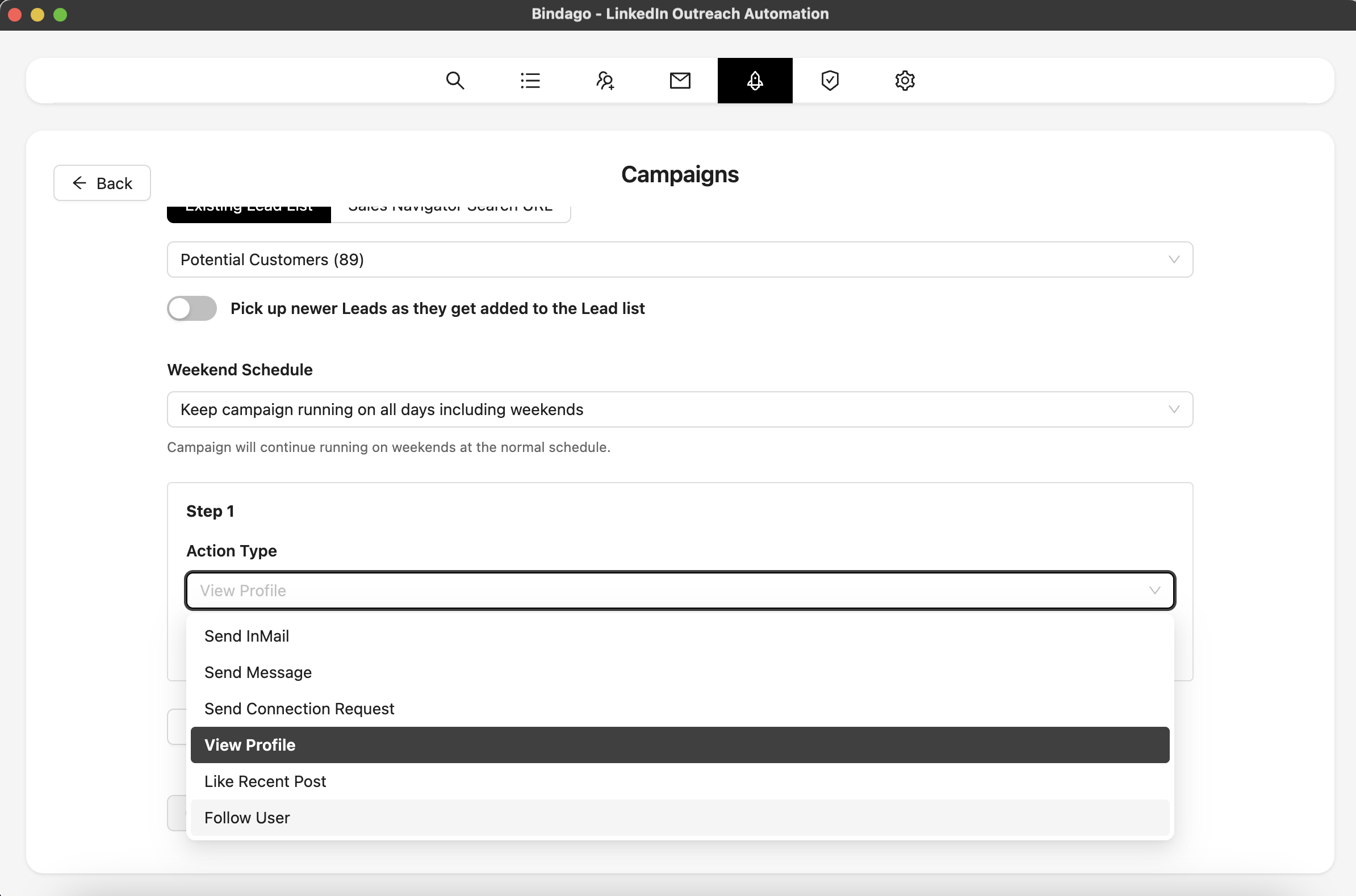
By using Bindago to automate this process, you create a powerful loop: you use repurposed content to attract interest, and then you use automation to turn that interest into conversations. And because Bindago is a desktop app, your LinkedIn credentials remain securely on your computer.
Conclusion
Stop the content creation treadmill. You are likely already sitting on a treasure trove of valuable content. By strategically repurposing your existing blog posts, videos, and threads for LinkedIn, you can build a consistent, high-impact content strategy without the burnout.
Combine this smart content approach with a systematic way to engage your audience, and you'll have a predictable engine for building your brand and generating leads on LinkedIn.
Ready to build your content engine and turn engagement into opportunities? Download Bindago today and start your 10-day free trial.
